
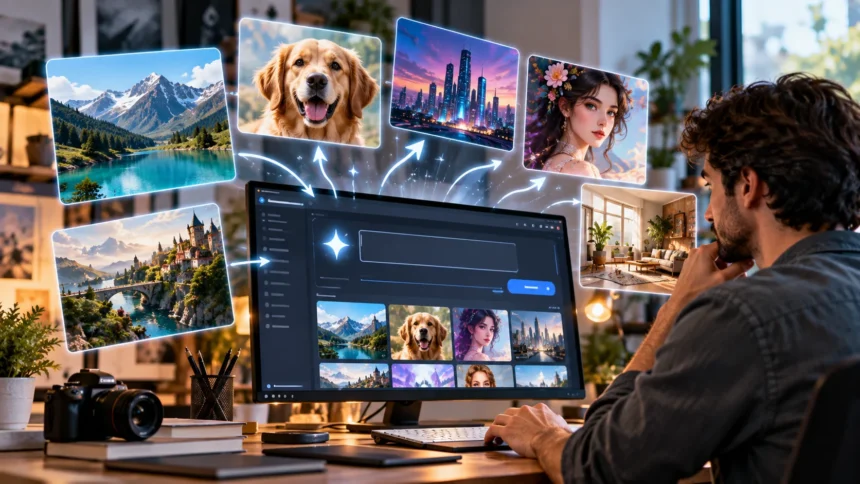
AI image generators have changed how people create digital artwork, marketing visuals, illustrations, and creative designs. Instead of drawing every detail manually, users can describe an idea in words and allow an artificial intelligence model to generate an image. However, the quality of the results often depends on how clearly the instructions communicate the intended subject, style, and composition.
Learning how to write better AI image prompts can help beginners and experienced creators produce more useful and visually appealing results. A well-written prompt gives the AI clear direction without introducing unnecessary confusion. This guide explains practical prompting techniques, common mistakes, useful examples, and strategies for improving AI-generated images.
What Is an AI Image Prompt?
An AI image prompt is a written instruction that describes the visual content you want an artificial intelligence system to generate. It may include the main subject, environment, artistic style, lighting, colors, and composition. The image generator interprets these descriptions to produce a visual result. Clear prompts help communicate the intended appearance more effectively.
For example, a basic prompt might request an image of a mountain landscape. A more detailed version could describe snowy mountains, a calm lake, early morning light, and realistic photography. Both instructions communicate the same general subject, but the second provides greater visual direction. This additional context can help produce results that better match the creator’s expectations.
AI image prompts do not need to be extremely long or complicated to work effectively. Their purpose is to communicate important visual details in a way the selected model can interpret. Different generators may respond differently to identical instructions. Understanding this variation is useful when creating images across multiple platforms.
Why Writing Better AI Image Prompts Matters
Writing effective prompts can improve the consistency and usefulness of AI-generated images. When instructions are vague, the system must make more decisions about the subject, background, and visual style. These decisions may not match what the user originally imagined. Providing clear details reduces unnecessary ambiguity and gives the model stronger creative direction.
Better prompts can also reduce the number of revisions needed to achieve a suitable result. A creator who specifies the intended composition and lighting may avoid repeatedly correcting those elements. This can make the image creation process more efficient. However, prompt quality does not guarantee perfect results because image generation remains probabilistic.
Prompt writing is particularly valuable for designers, marketers, bloggers, educators, and content creators. These professionals often need images that communicate a specific idea or fit an established visual style. Clear instructions help align generated visuals with their intended purpose. Learning prompt techniques can therefore support more effective creative workflows.
Start With a Clear Main Subject
The first step in writing a better AI image prompt is identifying the main subject. The subject might be a person, animal, object, building, landscape, or imaginary scene. Describing it clearly helps the generator understand what should receive the most attention. Avoid starting with unrelated details that obscure the central idea.
A simple prompt such as “a coffee shop” leaves many visual decisions to the AI. A more specific version could describe a cozy neighborhood coffee shop with wooden furniture and large windows. This establishes both the subject and the atmosphere. Adding meaningful details helps the model create a more recognizable scene.
When the image contains multiple subjects, explain their relationship and relative importance. For example, describe a bicycle leaning against a brick wall rather than listing a bicycle and wall separately. This helps establish spatial relationships within the composition. Clear subject descriptions are particularly useful when creating product visuals or storytelling illustrations.
Describe the Setting and Background
The background provides context and helps establish the overall mood of an AI-generated image. A subject placed in a modern office creates a different impression from the same subject in a forest. Describing the environment helps the model understand where the scene should take place. It also reduces the likelihood of unrelated background elements.
Useful setting details include location type, surrounding objects, weather, architecture, and time of day. For example, a portrait might feature a person standing inside a bright library with wooden bookshelves. A landscape prompt could describe rolling hills beneath a cloudy evening sky. These details help create a more complete visual environment.
The background should support the primary subject rather than compete with it unnecessarily. Too many unrelated objects can make the composition confusing or crowded. For professional visuals, a simple background may be more effective than an elaborate scene. Choose environmental details according to the image’s intended use and visual priorities.
Choose the Right AI Image Style
Visual style is one of the most influential elements in an AI image prompt. It determines whether the result resembles a photograph, illustration, painting, cartoon, or other creative format. Different styles communicate different moods and purposes. Selecting a clear direction helps the image generator interpret the desired appearance.
Photorealistic prompts often describe natural lighting, believable textures, and realistic environments. Illustration prompts may emphasize clean shapes, stylized colors, and simplified details. Other possibilities include watercolor painting, pencil drawing, pixel art, and three-dimensional rendering. Each style offers different advantages depending on the project’s requirements.
Combining too many conflicting styles can make the intended result less predictable. For example, requesting both highly realistic photography and a flat minimalist cartoon may create unnecessary ambiguity. A controlled combination can work when the relationship is clearly explained. However, beginners usually benefit from choosing one primary visual style.
Use Lighting to Improve AI Image Quality
Lighting strongly influences the atmosphere, depth, and appearance of an image. It affects how subjects are illuminated and how shadows reveal their shapes. AI image prompts can include lighting descriptions to establish a specific visual mood. Thoughtful lighting choices often make generated scenes feel more intentional.
Soft natural light is useful for comfortable indoor scenes, portraits, and lifestyle photography. Golden-hour lighting creates warm tones associated with early morning or late afternoon. Studio lighting is commonly used for professional product images. Dramatic side lighting can emphasize texture and create stronger contrast between illuminated and shadowed areas.
Lighting instructions should match the environment and intended visual style. A bright outdoor scene may benefit from natural sunlight, while a futuristic interior might feature colored artificial lighting. Avoid including several contradictory lighting conditions without a clear purpose. Consistent lighting descriptions help create a more believable visual result.
Improve Composition With Camera Angles
Composition describes how visual elements are arranged within an image. It influences what viewers notice first and how their attention moves through the scene. AI image prompts can specify framing, camera angle, and subject placement. These instructions help communicate the intended visual structure.
A close-up composition emphasizes small details, making it useful for product textures or facial expressions. Wide-angle views show more of the surrounding environment and can establish a sense of scale. Eye-level perspectives often create natural-looking scenes. Overhead views are commonly used for food photography, flat-lay arrangements, and workspace visuals.
Subject placement can also affect the usability of generated images. A centered composition works well for portraits and product images, while off-center framing may create room for additional design elements. Specifying negative space can be useful for website banners. Clear composition instructions help align an image with its final purpose.
Add Colors and Mood to Your Prompts
Color choices influence how viewers interpret an AI-generated image. Warm colors can create an inviting atmosphere, while cooler tones may suggest calmness or a technological setting. Including a color palette helps guide the visual direction. It can also improve consistency across a collection of related images.
A prompt might describe a living room featuring warm beige walls, natural wooden furniture, and muted green accessories. Another could request a futuristic cityscape illuminated by blue and purple lights. These descriptions provide a recognizable color identity. Specific colors are especially useful for branded content and themed illustrations.
Mood descriptions add another layer of creative direction by communicating the emotional atmosphere of a scene. Words such as peaceful, energetic, mysterious, or cheerful can influence visual choices. However, mood terms work best when supported by concrete details. A peaceful forest scene, for example, might include gentle sunlight, still water, and soft greenery.
Write AI Image Prompts With Specific Details
Specific details help distinguish an ordinary AI image prompt from a more carefully directed instruction. These details might include materials, textures, clothing, objects, or architectural features. Rather than requesting a beautiful room, describe the furniture, wall finishes, and lighting. Concrete visual information gives the model more useful guidance.
Texture descriptions are particularly valuable for realistic images. A wooden table with visible grain, a weathered brick wall, or a soft knitted blanket provides recognizable surface characteristics. These details can make objects appear more convincing. They are useful for interior design, food photography, product visuals, and architectural concepts.
However, including every possible detail can make a prompt unnecessarily complicated. Too many unrelated instructions may compete for attention or produce visual inconsistencies. Focus on characteristics that directly influence the image’s purpose. A concise prompt containing meaningful visual information is often more effective than a long description filled with decorative language.
Use Negative Prompts to Avoid Unwanted Elements
Negative prompts describe elements that should be excluded from an AI-generated image. Some image generators provide dedicated negative prompt fields, while others accept exclusion instructions in ordinary language. Their effectiveness varies between models. Understanding the platform’s capabilities helps determine the best approach.
For example, a product image prompt might request a clean background without distracting objects or visible branding. A landscape illustration could specify that no buildings or vehicles should appear. These instructions communicate what should be absent from the scene. However, negative prompts cannot guarantee that every unwanted element will disappear.
Negative instructions are most useful when they are clear and limited to important restrictions. Long collections of unrelated exclusions may create confusion or provide little additional benefit. It can also be more effective to describe the desired appearance positively. For instance, requesting an uncluttered white background may work better than listing numerous objects to avoid.
How to Write Realistic AI Photography Prompts
Realistic AI photography prompts should describe scenes using details associated with actual photographic images. These may include believable lighting, natural materials, camera perspectives, and environmental conditions. Rather than relying entirely on the word “realistic,” explain what makes the scene visually convincing. Consistent physical details can improve the overall result.
A useful example is a modern kitchen with natural sunlight entering through a large window, wooden cabinets, and realistic stone countertops. The prompt establishes the subject, materials, environment, and lighting. Adding a wide interior photography perspective further clarifies the composition. This approach provides more guidance than simply requesting a realistic kitchen.
Photography terminology can be helpful when the generator understands it, but technical camera settings are not always necessary. Terms such as close-up, shallow depth of field, and soft background blur often communicate useful effects. Exact lens specifications may influence some models more than others. The strongest prompts combine clear scene descriptions with relevant photographic direction.
How to Create Better AI Product Image Prompts
AI-generated product images require careful attention to the main object, background, and presentation. The product should be easy to recognize and visually separated from distracting surroundings. Prompts can specify lighting, viewing angle, surface materials, and composition. These details are particularly valuable for advertising concepts and ecommerce design mockups.
For example, a skincare bottle could be presented on a clean stone surface with soft studio lighting and a neutral background. The prompt might request a centered composition with realistic reflections and subtle shadows. This creates a clear product photography direction. Additional decorative elements should support the product rather than dominate the image.
AI-generated product visuals should be reviewed carefully before commercial use. Image generators may alter packaging details, invent labels, or change product shapes. Such inaccuracies can misrepresent a real product. Using verified photographs or appropriate editing workflows is important when visual accuracy and consumer trust are essential.
Common AI Image Prompt Mistakes to Avoid
One common mistake is writing prompts that are too vague to communicate a clear visual objective. Words such as amazing, professional, or beautiful may express preferences without specifying what the image should contain. Different models can interpret these descriptions in different ways. Adding details about subject, composition, and lighting provides stronger direction.
Another mistake involves combining conflicting instructions within the same prompt. Asking for a dark nighttime scene with bright midday sunlight creates an unclear visual objective. Similarly, requesting several unrelated artistic styles can reduce consistency. Reviewing a prompt for contradictions before generating an image can prevent unnecessary revisions.
Beginners also sometimes assume that longer prompts always produce better results. In reality, excessive details can make important instructions harder to prioritize. Prompt effectiveness depends on clarity, relevance, and compatibility with the chosen generator. Starting with a focused description and adding details gradually often provides a more manageable workflow.
How to Improve AI Image Prompts Step by Step
Improving an AI image prompt begins with evaluating the first generated result. Identify which elements match the intended idea and which require changes. The issue might involve incorrect lighting, background clutter, or an unsuitable camera angle. Focusing on specific differences makes revisions more purposeful.
Next, adjust one or two important parts of the prompt rather than rewriting everything immediately. For example, change a general lighting description to soft natural window light. If the subject appears too small, request closer framing. Making controlled adjustments helps identify which instructions influence the result.
Continue refining the prompt until the image serves its intended purpose. Some generators also provide editing, reference image, or variation features that can help preserve successful elements. Saving useful prompts makes it easier to reproduce similar visual styles later. Iterative experimentation is an important part of developing effective AI image prompting skills.
Best AI Image Prompt Formula for Beginners
A simple prompt formula can help beginners organize their ideas before using an image generator. Start with the main subject, followed by the setting and important visual details. Then describe the preferred artistic style, lighting, and composition. Include any essential restrictions only when they are relevant.
For example, consider a prompt describing a cozy reading corner with a comfortable chair beside a large window. Add wooden bookshelves, indoor plants, soft morning sunlight, and realistic interior photography. Finish with a wide composition and natural colors. This structure provides enough direction without requiring complicated technical terminology.
The formula can be adapted for different creative projects, including landscapes, illustrations, advertisements, and educational visuals. Some tasks may require additional information about perspective or image dimensions. Others may need only a short description. The goal is to create a flexible structure that improves clarity rather than follow an unnecessarily rigid template.
AI Image Prompt Examples for Different Projects
For realistic interior design, a prompt could describe a modern living room featuring a beige sofa, wooden coffee table, indoor plants, and large windows. Soft natural daylight and realistic textures establish the photographic style. A wide-angle perspective shows the arrangement of furniture. This example works well for home decorating inspiration.
For a technology illustration, describe a modern data center with organized server racks, subtle blue lighting, and detailed equipment. Request a realistic three-dimensional appearance with balanced contrast and a clean composition. These elements communicate a professional technology environment. The prompt can be adjusted for cybersecurity, cloud computing, or networking concepts.
For food photography, describe a freshly prepared breakfast served on a ceramic plate beside a window. Include natural textures, soft morning sunlight, and a slightly elevated camera angle. A simple wooden table can provide an attractive background. These examples demonstrate how combining a clear subject with supportive visual details creates more focused prompts.
How AI Image Prompts Differ Across Generators
Different AI image generators interpret prompts according to their training methods, model architecture, and available controls. An instruction that works well in one system may produce different results in another. Some tools respond effectively to conversational descriptions, while others offer specialized parameters. Understanding these differences can improve prompt consistency.
Certain platforms provide controls for aspect ratio, image references, editing, or visual style. Others rely more heavily on ordinary language instructions. These features influence how much information belongs in the written prompt. Users should explore the guidance provided by their selected platform rather than assuming every generator behaves identically.
Testing the same idea across different models can reveal useful differences in image quality and interpretation. One generator may produce stronger photorealistic scenes, while another may handle illustration styles more effectively. Results can also change as models receive updates. Flexible prompting skills are therefore more useful than memorizing instructions for one specific platform.
How to Write AI Image Prompts for Social Media
Social media images often need clear subjects and visually recognizable compositions. Users may view these images on small screens, making overly complicated details difficult to notice. Prompts should prioritize the main subject and establish a suitable visual style. Strong contrast and simple backgrounds can help important elements remain visible.
For a lifestyle post, describe a person enjoying coffee in a bright café with natural sunlight and a relaxed atmosphere. For a travel post, request a scenic coastal landscape with clear water and warm evening light. Each prompt should reflect the content’s topic. Visual consistency becomes especially important when creating multiple posts for the same brand.
Image dimensions and aspect ratios should also match the intended publishing platform. A vertical composition may suit a story, while a square or landscape format may work better for other placements. Exact requirements vary by platform and can change. Checking the final crop helps prevent important subjects from being cut off.
How to Write AI Image Prompts for Blog Featured Images
Blog featured images should visually communicate the article’s main topic without requiring lengthy explanations. A good prompt identifies the subject and uses supporting details that readers can understand quickly. For example, a home improvement article may benefit from a realistic photograph of the relevant tool or material. The image should match the article’s actual subject.
For technology articles, prompts can show realistic workspaces, computer equipment, or visual representations of digital concepts. A machine learning article might feature a modern computer workstation displaying abstract data visualizations. However, overly generic technology imagery may fail to communicate the topic clearly. Choosing recognizable elements helps make featured images more relevant.
Many blogs use landscape featured images because they fit common website layouts. A 16:9 aspect ratio, such as 1280 by 720 pixels, is one practical option when supported by the design. Prompts can also request clean compositions without embedded text or logos. Reviewing the final image ensures it remains visually useful at different display sizes.
Advanced Tips for Writing Better AI Image Prompts
Advanced prompting often involves prioritizing visual instructions rather than adding more descriptive words. Begin with the elements that must be correct, such as the main subject and its relationship to the environment. Follow with supporting details about texture, lighting, and style. This approach helps maintain a consistent creative objective.
Reference images can also improve consistency when the selected platform supports them. A reference may communicate color palettes, composition, or visual style more precisely than words alone. However, the ability to follow references varies between tools. Users should also consider intellectual property and permission requirements when working with existing images.
Another useful technique is developing reusable prompt templates for recurring projects. A business may create a consistent structure for product photography or blog visuals. The subject can change while lighting, framing, and background preferences remain similar. Reusable templates make content production more organized and help maintain a recognizable visual identity.
Conclusion
Learning how to write better AI image prompts begins with understanding the importance of clear visual communication. Effective prompts describe the main subject, setting, style, lighting, colors, and composition. These details help image generators interpret creative ideas more accurately. A focused description often produces more useful results than vague or unnecessarily complicated instructions.
Improving prompt quality also requires experimentation and careful evaluation. Different AI image generators respond differently to the same instructions, and no prompt guarantees a perfect result. Revising specific elements, comparing outputs, and saving successful examples can strengthen prompting skills. These practices help creators develop more reliable workflows for generating digital visuals.
Whether you create blog featured images, product concepts, social media graphics, or artistic illustrations, better prompts can make the process more efficient. Start with a clear idea and build the description around important visual details. With regular practice and thoughtful refinement, AI image prompting can become a valuable creative skill.
Frequently Asked Questions
How do you write a good AI image prompt?
Start by describing the main subject, setting, and intended visual style. Add relevant details about lighting, colors, textures, and camera perspective to help the image generator produce a more focused result.
What should an AI image prompt include?
An effective prompt typically includes the subject, environment, artistic style, composition, and lighting. Additional details such as materials, mood, or background restrictions can help when they directly support the intended image.
Do longer AI image prompts create better images?
Not necessarily. Longer prompts can provide useful details, but excessive or contradictory instructions may create confusion. Clear, specific, and relevant descriptions are generally more valuable than unnecessary length.
How can I make AI-generated images look realistic?
Describe believable materials, natural lighting, realistic textures, and appropriate camera perspectives. Consistent environmental details can improve photorealism, although the final quality also depends on the image generation model.
Can I use the same prompt in different AI image generators?
Yes, but the results may differ because image generators interpret instructions differently. Adjusting wording, style controls, and available settings can help achieve more consistent results across different platforms.