
Imagine taking a photograph of an unfamiliar plant and having your smartphone suggest what it might be within seconds. You do not need to describe its leaves, explain its color, or spend hours searching online. The technology analyzes the image and provides a possible answer.
But how can a computer recognize something without having human eyes? For many people, understanding the technology behind image recognition feels unnecessarily complicated, especially when explanations contain unfamiliar technical terms.
This is where computer vision comes into play. Understanding its basics can help you discover how machines interpret visual information, solve everyday problems, and support better decisions across different industries.
What Is Computer Vision?
Computer vision is a branch of artificial intelligence that enables computers to process, analyze, and interpret visual information. It allows machines to extract useful details from digital images, videos, and other visual inputs.
Unlike humans, computers do not naturally understand what appears in a photograph. They process images as numerical information and use algorithms to identify patterns associated with particular objects, shapes, and features.
For example, a computer vision system can identify vehicles in a photograph or recognize printed text on a document. These capabilities make visual information easier to organize, analyze, and use.
Why Is Computer Vision Important?
Processing thousands of images manually can consume valuable time and resources. People may also overlook important details when performing repetitive visual inspection tasks for extended periods.
Computer vision helps address these challenges by automating suitable visual analysis tasks. It allows organizations to examine large amounts of visual data more efficiently while maintaining appropriate quality control procedures.
From identifying manufacturing defects to organizing digital photographs, this technology supports many practical activities. Its real value comes from solving specific problems that would otherwise require considerable manual effort.
How Does Computer Vision Work?
A computer cannot simply look at an image and understand its contents like a human. It needs to convert visual information into a format that algorithms can process and analyze.
Computer vision systems examine pixels, colors, shapes, textures, and other visual characteristics. Machine learning models use relationships between these features to identify objects or generate predictions about an image.
The process generally involves several important steps:
- Image acquisition: Collecting images or videos through cameras or other imaging devices.
- Image preprocessing: Preparing visual information for analysis.
- Feature extraction: Identifying relevant visual characteristics.
- Pattern recognition: Comparing learned visual relationships.
- Prediction: Classifying objects or generating other useful outputs.
The accuracy of the final result depends on the system’s design, training data, and quality of the visual input.
How Do Computers See Images?
When you look at a photograph, you can usually recognize familiar objects immediately. However, a computer receives that same photograph as a collection of numerical values rather than meaningful objects.
Digital images consist of tiny units called pixels. Each pixel contains information about brightness or color, allowing computers to represent an entire image through organized numerical data.
Computer vision algorithms analyze relationships between these pixels to identify meaningful visual patterns. By examining these relationships, a trained model can distinguish between objects such as trees, buildings, animals, and vehicles.
The Role of Machine Learning in Computer Vision
Creating fixed instructions for recognizing every possible object would be extremely difficult. Objects can appear in different positions, sizes, colors, and lighting conditions, making traditional programming insufficient for many visual tasks.
Machine learning helps computers identify patterns by learning from relevant training data. Instead of manually defining every visual feature, developers train models using examples that represent the objects or conditions they want to recognize.
Imagine training a system using photographs of different fruits. By learning relevant visual characteristics, the model may eventually distinguish apples from oranges in previously unseen photographs.
How Deep Learning Improves Computer Vision
Simple image processing techniques may struggle when photographs contain complex backgrounds or overlapping objects. Identifying meaningful information becomes more difficult when multiple visual features appear together.
Deep learning uses artificial neural networks with multiple processing layers to learn complex visual representations. These networks can identify relationships between simple features, such as edges, and more complicated patterns associated with objects.
Convolutional neural networks and vision transformers are common approaches used in modern computer vision. Their effectiveness depends on appropriate training, relevant datasets, and careful evaluation under realistic operating conditions.
6 Main Types of Computer Vision Tasks
Not every computer vision application performs the same function. Some systems identify objects, while others locate specific features, interpret text, or monitor movement within video recordings.
Understanding these differences helps you recognize which technology is appropriate for a particular problem. The following six computer vision tasks demonstrate how machines process visual information in different ways.
1. Image Classification
Imagine having thousands of digital photographs that need organizing into separate categories. Reviewing every photograph manually could take hours or even days, depending on the collection’s size.
Image classification assigns a category or multiple categories to an image based on its visual contents. For example, a trained system might classify photographs as landscapes, animals, food, or buildings.
This technique is commonly used in digital photo organization, product categorization, and visual quality assessment. Its reliability depends on how accurately the model recognizes the relevant image categories.
2. Object Detection
Knowing that an image contains an object is not always enough. Sometimes, you also need to identify where that object appears and whether other relevant objects are present.
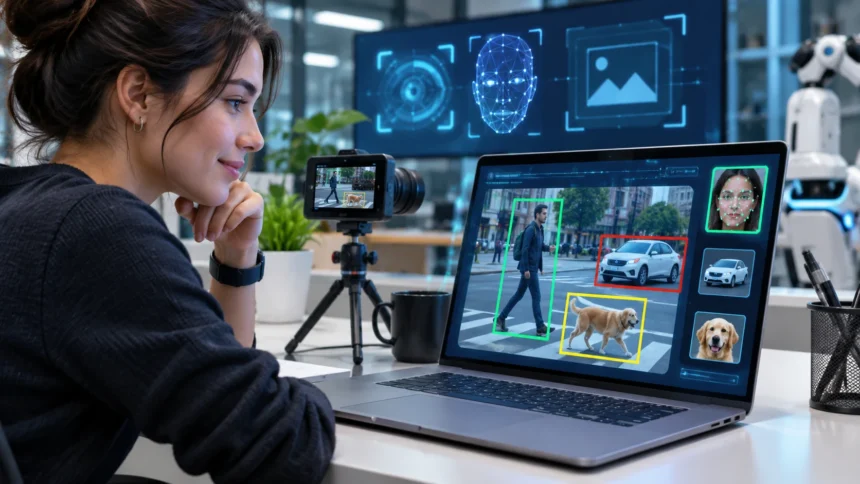
Object detection identifies and locates particular objects within images or videos. These systems commonly use rectangular boundaries to show where detected objects appear within the visual scene.
For example, an object detection model could identify vehicles, traffic signs, and pedestrians in a street photograph. Each detected object may receive a category label and an estimated confidence score.
3. Image Segmentation
Some visual tasks require greater precision than simply drawing a rectangle around an object. Understanding the exact boundaries of individual objects may be necessary for more detailed image analysis.
Image segmentation assigns labels to individual pixels or groups of pixels. This allows computers to distinguish specific regions and separate objects from their surrounding backgrounds.
For example, photo editing applications can use segmentation to separate a subject from the background. Medical imaging applications may also use it to support qualified professionals in examining particular anatomical structures.
4. Facial Detection and Recognition
Identifying whether a photograph contains a face and determining whose face it is are two different tasks. Confusing these capabilities can create misunderstandings about what computer vision systems actually do.
Facial detection locates human faces within visual information. Facial recognition attempts to match facial features against stored reference data to verify or identify an individual.
These technologies have different accuracy, privacy, and security considerations. Their use requires careful evaluation, appropriate authorization, and safeguards against incorrect identification or misuse of personal information.
5. Optical Character Recognition
Extracting written information from scanned documents can become time-consuming when the original text is unavailable in an editable format. Manually retyping lengthy documents may also introduce unnecessary mistakes.
Optical character recognition, commonly called OCR, converts visible text from images into machine-readable text. It helps computers process printed documents, receipts, invoices, and other text-based visual materials.
For instance, a business can use OCR to extract information from scanned invoices. Employees should still verify important details because unclear images and unusual fonts may cause recognition errors.
6. Object Tracking
Recognizing an object in a single photograph does not explain how it moves over time. Video analysis requires systems that can connect visual information across multiple frames.
Object tracking follows detected objects throughout a sequence of images or video frames. It helps systems estimate changes in position, movement, and other relevant visual characteristics.
For example, sports analysis applications can track a ball during recorded gameplay. This information may help analysts understand movement patterns and review important moments more efficiently.
Real-World Applications of Computer Vision
Computer vision may sound like a technology reserved for advanced research laboratories. However, many people already interact with visual recognition systems while using smartphones, shopping online, or accessing digital services.
Businesses use computer vision to solve practical problems involving large amounts of visual information. Its applications continue to support activities where consistent image analysis can provide meaningful benefits.
Some common computer vision applications include:
- Healthcare: Supporting medical image analysis and professional assessments.
- Manufacturing: Identifying visible product defects during quality inspections.
- Retail: Organizing product images and monitoring inventory.
- Agriculture: Analyzing crop conditions and visible plant characteristics.
- Transportation: Supporting driver assistance and traffic analysis.
- Education: Converting scanned learning materials into accessible text.
- E-commerce: Helping customers discover products through visual search.
Each application requires appropriate testing to ensure its results are sufficiently reliable for the intended purpose.
Computer Vision in Healthcare
Healthcare professionals often need to examine detailed medical images containing subtle visual differences. Reviewing large collections of scans can require considerable time, specialized training, and careful attention.
Computer vision can support healthcare professionals by highlighting relevant image features and organizing visual information. Some applications assist with analyzing X-rays, MRI scans, and other medical imaging materials.
However, automated predictions can be incorrect and should not replace professional medical judgment. Healthcare organizations must evaluate these systems carefully and protect confidential patient information throughout their use.
Computer Vision in Business and Manufacturing
Manufacturing businesses may struggle to maintain consistent product quality when production volumes increase. Manual inspections can become repetitive, making certain defects more difficult to identify consistently.
Computer vision systems can examine products for visible problems such as incorrect labels, surface damage, or irregular shapes. These systems help quality control teams identify items that require further inspection.
Businesses can begin by introducing computer vision to a specific inspection task with measurable requirements. Comparing automated results with existing quality control methods helps determine whether the investment provides practical value.
Computer Vision vs. Image Processing
Many beginners confuse computer vision with image processing because both technologies work with digital images. Although they are closely related, they generally serve different purposes within visual computing systems.
Image processing focuses primarily on transforming or improving images. Computer vision focuses on extracting meaningful information from images and interpreting their visual contents.
The following comparison explains their main differences.
| Feature | Image Processing | Computer Vision |
|---|---|---|
| Primary purpose | Modify or improve images | Interpret visual information |
| Typical input | Images or video frames | Images or videos |
| Typical output | A processed image | Labels, locations, or predictions |
| Common tasks | Resizing and noise reduction | Object detection and recognition |
| Practical example | Adjusting image brightness | Identifying objects in an image |
Both technologies frequently work together to improve the performance of visual analysis applications.
Benefits of Computer Vision Technology
Organizations often face difficulties when visual inspection and image analysis become increasingly demanding. Hiring additional employees or expanding manual processes may not always provide an efficient long-term solution.
Computer vision can help automate repetitive visual tasks and make large collections of images easier to analyze. Its benefits depend on how well the technology matches the organization’s requirements.
Key benefits of computer vision include:
- Faster processing of large visual datasets.
- Reduced repetitive manual inspection.
- Improved consistency in suitable recognition tasks.
- Better organization of images and documents.
- More accessible visual information.
- Support for data-driven business decisions.
- Potential operational cost savings.
These advantages are most meaningful when businesses establish clear objectives and measure actual system performance.
Challenges and Limitations of Computer Vision
Even advanced computer vision systems can struggle when images contain unexpected objects, poor lighting, or unfamiliar backgrounds. A model that performs well during training may not achieve similar results in real-world environments.
Poor-quality training data, incomplete visual information, and biased datasets can also reduce accuracy. Privacy concerns become particularly important when systems process photographs or videos containing identifiable individuals.
Common computer vision challenges include:
- Poor image quality and inconsistent lighting.
- Limited or unrepresentative training data.
- Difficulty recognizing unfamiliar objects.
- Incorrect predictions and false detections.
- Privacy and data security concerns.
- Computational and infrastructure costs.
Regular testing, representative datasets, suitable security measures, and human oversight help reduce these limitations.
How to Get Started with Computer Vision
Learning computer vision can feel overwhelming when tutorials introduce complicated programming concepts too early. Beginners may struggle to understand where to start or which skills are necessary.
Start by learning how digital images represent information and how basic machine learning models recognize patterns. Understanding these foundations makes more advanced computer vision concepts easier to explore.
Follow these steps to build your knowledge gradually:
- Learn basic Python programming.
- Understand pixels, image dimensions, and color channels.
- Explore basic image processing techniques.
- Learn introductory machine learning concepts.
- Practice with tools such as OpenCV.
- Explore image classification using public datasets.
- Evaluate model predictions and identify common errors.
Begin with a simple project, such as classifying photographs of fruits or flowers. A manageable project helps you understand the complete process without becoming overwhelmed by unnecessary technical complexity.
What Is the Future of Computer Vision?
Traditional visual recognition systems often struggle when operating conditions change unexpectedly. Improving their ability to interpret unfamiliar environments remains an important area of artificial intelligence research.
Developments in deep learning, multimodal AI, and efficient visual models aim to improve recognition capabilities. These advances may support more useful applications in accessibility, scientific research, manufacturing, and other industries.
However, improved technology does not remove concerns about accuracy, privacy, or responsible implementation. Future computer vision systems will still require appropriate evaluation, transparent limitations, and meaningful human accountability.
Conclusion
Computer vision makes it possible for machines to extract meaningful information from images and videos. Through machine learning, neural networks, and visual pattern recognition, computers can support tasks that previously required extensive manual analysis.
Understanding computer vision does not require mastering every technical concept immediately. Learning its basic processes, real-world applications, benefits, and limitations provides a strong foundation for exploring artificial intelligence more confidently.
Start by experimenting with a simple image classification tool or exploring how your smartphone recognizes objects. Observe its predictions, identify its mistakes, and gradually develop your understanding of how machines interpret the visual world.
Frequently Asked Questions
What is computer vision in simple words?
Computer vision is a branch of artificial intelligence that helps computers analyze images and videos. It enables machines to recognize objects, identify patterns, and extract useful visual information.
What is an example of computer vision in everyday life?
A smartphone application that recognizes plants from photographs is a common example. It analyzes visual features and uses learned patterns to suggest possible plant categories or species.
Is computer vision part of artificial intelligence?
Yes, computer vision is a field of artificial intelligence focused on interpreting visual information. It commonly uses machine learning, deep learning, and image processing to perform visual recognition tasks.
Is computer vision difficult to learn?
Computer vision can be challenging at advanced levels, but beginners can start with basic image processing and machine learning concepts. Simple practical projects make the learning process more manageable.
What programming language is best for computer vision?
Python is a popular choice because of its accessible syntax and extensive computer vision libraries. Tools such as OpenCV, PyTorch, and TensorFlow support many visual analysis and machine learning projects.