
How to Make Flashcards From Notes Using AI
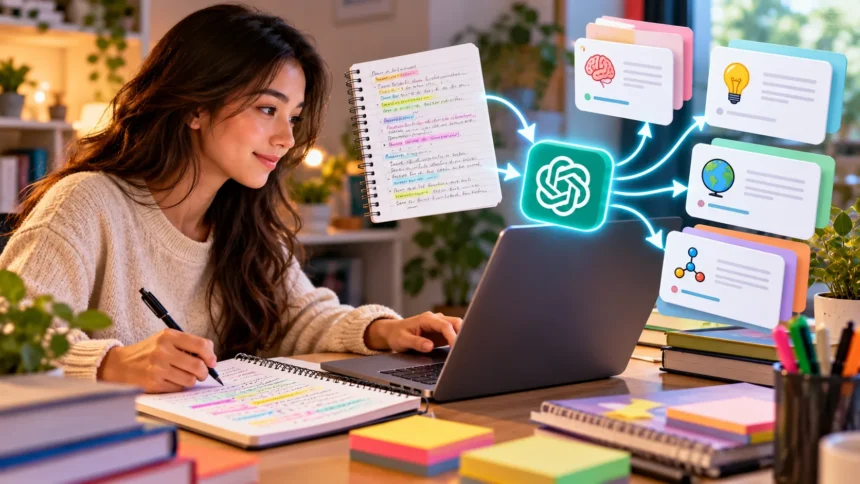
Making flashcards from notes using AI is a practical way to organize study materials and prepare for exams. Instead of manually writing questions and answers, students can use artificial intelligence to turn their class notes into revision cards. AI tools can identify important concepts, definitions, and facts from written material. This approach makes the initial preparation process faster and allows more time for active learning.
Flashcards are useful because they encourage students to remember information without constantly looking at their textbooks. Each card usually contains a question, keyword, or concept on one side and an answer on the other. AI flashcard generators can suggest these combinations automatically. Students can then review, edit, and organize the cards according to their learning needs.
Learning how to make flashcards from notes using AI involves choosing a suitable tool, preparing accurate notes, and generating meaningful questions. The process works with typed notes, copied textbook summaries, and sometimes scanned handwritten pages. However, AI-generated content should always be checked for accuracy. With careful review, digital flashcards can become an effective part of a consistent study routine.
What Are AI Flashcards and How Do They Work?
AI flashcards are digital study cards generated with the assistance of artificial intelligence. They usually contain a question, term, or concept paired with a corresponding answer or explanation. Unlike traditional flashcards, which students prepare entirely by hand, AI-generated cards can be developed from existing learning materials. This reduces the repetitive work involved in organizing large amounts of information.
An AI flashcard generator analyzes the notes supplied by the student and identifies information that could be useful for revision. It may recognize definitions, historical dates, scientific principles, formulas, or important relationships between ideas. The tool then transforms selected information into question-and-answer pairs. Some applications also support multiple-choice questions, fill-in-the-blank cards, and other revision formats.
The quality of AI flashcards depends on the accuracy and clarity of the original study material. Well-organized notes generally make it easier for AI to identify important concepts and generate relevant questions. Incomplete or confusing material can lead to misleading answers. Students should therefore treat AI-generated flashcards as editable study resources rather than automatically verified information.
Why Use AI to Turn Notes Into Flashcards?
One major advantage of AI flashcard creation is the amount of preparation time it can save. Manually reviewing several chapters and writing individual questions can be a lengthy process. AI tools can suggest a set of cards from the same material much more quickly. This allows students to devote additional time to practicing and checking their understanding.
AI can also help students identify concepts they may have overlooked while reading their notes. For example, a history chapter might contain important events, historical figures, causes, and consequences. A flashcard generator can suggest questions about these different types of information. Reviewing the suggestions helps students identify useful revision opportunities.
Another benefit is flexibility because AI-generated flashcards can be adapted for different subjects and study goals. Students may request simple definition cards, detailed conceptual questions, or short exam-style prompts. The same notes can support several types of practice. This makes AI useful for preparing revision materials across a wide range of academic subjects.
Choose the Right AI Tool for Flashcard Creation
Choosing a suitable AI flashcard tool depends on your study materials, preferred workflow, and required features. Some tools generate question-and-answer pairs directly from pasted text, while others support document uploads. Certain flashcard applications also include review scheduling and progress tracking. Consider which functions will actually help you study before selecting a platform.
ChatGPT can help convert copied notes into flashcard questions and answers through written prompts. Dedicated flashcard platforms may simplify storing, organizing, and reviewing large collections of cards. Some applications support importing material from documents or converting generated questions into reusable study decks. Features and access limits can vary between tools and subscription plans.
Before uploading study material, check whether the platform supports your file format and language. Review its privacy settings, especially if your notes contain personal information or details about other students. Avoid sharing passwords, private records, or unnecessary identifying information. A suitable tool should make studying easier while keeping your information appropriately protected.
Prepare Your Notes Before Generating Flashcards
Preparing your notes is an important step because AI works better when the source material is organized and understandable. Begin by reviewing your class notes for missing explanations, unclear abbreviations, and repeated information. Separate unrelated subjects and identify the main topics within each chapter. This gives the AI a clearer structure to follow.
You can organize your study material using headings, short paragraphs, definitions, and numbered concepts. For example, biology notes might contain separate sections about cells, tissues, organs, and body systems. Keeping these topics distinct helps prevent unrelated ideas from being combined into confusing questions. Clear formatting can also make the generated cards easier to review.
Check important facts against your textbook or official class materials before submitting the notes. AI cannot reliably correct every mistake already present in the original text. If a date, formula, or definition is incorrect, the generated flashcard may repeat that error. Accurate source material is essential for building trustworthy revision cards.
How to Make Flashcards From Notes Using ChatGPT
ChatGPT can turn written notes into flashcards by identifying important information and organizing it into question-and-answer pairs. Start by opening ChatGPT and preparing the material you want to study. You can paste a short section of notes into the conversation. For longer documents, use supported upload features where available or divide the content into smaller sections.
Next, explain exactly how you want the flashcards formatted. Ask ChatGPT to identify the most important concepts and generate clear questions with brief, accurate answers. You can also specify the number of cards and the academic level. Providing these details helps the tool generate material that matches your revision goals.
Once the flashcards appear, read through each question and answer carefully. Check whether the questions cover the important topics and whether the answers match your original notes. Request corrections if any card seems unclear, repetitive, or inaccurate. After reviewing the results, copy the flashcards into your preferred study application or document.
Best AI Prompts for Generating Study Flashcards
A clear prompt helps AI understand the type of flashcards you need and how they should be organized. Without specific instructions, the tool may generate answers that are too long or focus on less important details. Mention the subject, difficulty level, preferred format, and number of questions. You should also explain whether the AI must use only your notes.
For example, you can use this prompt: “Turn the following biology notes into 20 flashcards for exam preparation. Write one clear question and a short answer for each card. Cover important definitions, processes, and relationships. Use only the information contained in my notes, and identify anything that appears unclear or incomplete.”
You can improve the prompt further by requesting different question types or levels of difficulty. For mathematics, ask for formulas and practice problems that test when to use them. For history, request cards about events, dates, and causes. Specific instructions make the generated flashcards more relevant and reduce unnecessary editing.
Convert Handwritten Notes Into AI Flashcards
Handwritten class notes can also be used to generate AI flashcards, although they may require an additional conversion step. Many applications can recognize handwriting in photographs or scanned pages using optical character recognition. This technology attempts to turn written characters into editable digital text. The results depend on handwriting clarity, image quality, and the recognition system.
To begin, photograph or scan the pages in good lighting with the text clearly visible. Make sure the pages are not folded, blurry, or partly hidden by shadows. Use a suitable text-recognition application to extract the written content. If your AI tool supports image interpretation, it may also be able to work directly from uploaded photographs.
Review the converted text before asking AI to generate flashcards. Handwriting recognition can confuse similar characters, mathematical symbols, and scientific terminology. Correct these mistakes and organize the material into logical sections. Once the text is accurate, follow the same flashcard generation process used for typed notes.
Turn PDF Notes and Documents Into Flashcards
PDF files are commonly used for lecture notes, textbook summaries, and classroom handouts. AI tools with document-processing capabilities may help extract important information from these files and convert it into flashcards. This is particularly useful when students have several pages of revision material. However, file compatibility and processing limits vary between applications.
Start by selecting the relevant pages or chapter rather than uploading an unnecessarily large document. Ask the AI to identify key definitions, explanations, and important relationships within the selected material. Request short question-and-answer pairs organized by topic. This helps maintain focus and makes the resulting deck easier to study.
Some PDF documents contain scanned images rather than selectable text, which can make extraction more difficult. Mathematical equations, diagrams, and complex tables may also be interpreted incorrectly. Compare generated answers with the original document before using them for revision. Careful checking helps prevent formatting or extraction problems from becoming study errors.
How to Make Effective Question-and-Answer Flashcards
An effective flashcard usually focuses on one important concept rather than several unrelated facts. Questions should be clear enough to understand without requiring unnecessary background information. Answers should be brief while still including the essential details needed for accuracy. This structure makes cards easier to review and helps students identify specific gaps in knowledge.
For example, a science flashcard might ask, “What is photosynthesis?” with an answer explaining how plants use light energy to make sugars. A separate card could ask why chlorophyll is important. Dividing these ideas allows each question to test a particular concept. Students can then recognize which parts of the topic require additional attention.
Avoid turning every sentence from your notes into a separate flashcard. Some information may be repetitive, overly detailed, or better understood through longer explanations. Ask AI to prioritize concepts that are important for understanding and assessment. A focused collection of meaningful questions is generally more useful than an unnecessarily large deck.
Use AI to Generate Different Types of Flashcards
Traditional question-and-answer cards are useful, but they are not the only format available for studying. AI can help generate definition cards, fill-in-the-blank questions, and concept-based prompts. Different formats encourage students to retrieve information in different ways. Choosing the right type depends on the subject and the skill being practiced.
Definition cards work well for vocabulary, scientific terminology, and important historical concepts. Fill-in-the-blank cards can be helpful for remembering formulas, key terms, and specific facts. Conceptual questions encourage deeper explanations and connections between ideas. AI can suggest a combination of formats from the same notes.
For subjects involving problem-solving, consider using flashcards that ask when a formula or method should be applied. In language learning, include vocabulary alongside example sentences and grammatical context. For science, ask students to explain processes rather than memorize isolated words. Matching the card format to the learning objective improves the usefulness of revision.
Organize AI Flashcards by Subject and Topic
Organizing flashcards makes it easier to locate relevant material and plan revision sessions. When several subjects are combined in one large collection, students may struggle to focus on particular chapters. AI can help divide cards into smaller topic-based groups. These groups are often called decks or subdecks in digital flashcard applications.
For example, a biology deck could contain separate sections for human anatomy, genetics, ecology, and cell biology. A mathematics deck might be divided into algebra, geometry, and statistics. Ask AI to label each card according to its topic before exporting the content. Consistent labels help keep the collection manageable as more cards are added.
You can also organize flashcards according to difficulty, upcoming exams, or revision priority. Cards covering challenging concepts may need more frequent attention than familiar material. Avoid dividing topics into so many categories that finding the right deck becomes difficult. A simple organization system supports efficient studying and regular review.
Export AI Flashcards to Anki or Quizlet
After generating flashcards with AI, you may want to transfer them into a dedicated study platform. Applications such as Anki and Quizlet allow students to organize flashcard collections and review material digitally. Import options depend on the platform and its current features. Check the accepted format before preparing your generated cards.
A common approach is to ask AI to arrange the flashcards into two columns containing questions and answers. These can be saved as a spreadsheet or a compatible text file. Some applications accept comma-separated or tab-separated values for importing card data. Be careful when answers contain commas or line breaks that might affect formatting.
Before importing a large deck, test a few flashcards to confirm that questions and answers appear correctly. Check whether special characters, mathematical symbols, and non-English text remain readable. Make any necessary corrections before transferring the complete collection. This prevents avoidable formatting problems from interfering with your revision routine.
Use Spaced Repetition With AI Flashcards
Spaced repetition is a study technique that involves reviewing information at intervals over time. Instead of repeatedly studying the same cards during a single session, students revisit them across several days or weeks. This approach helps strengthen long-term memory through repeated retrieval. Many digital flashcard applications include scheduling features based on this principle.
AI can help suggest a simple spaced repetition plan based on the topics you need to learn. For example, you might review a new card the following day, again several days later, and once more after a week. These intervals are only examples and should change according to performance. Difficult concepts may require more frequent practice.
When reviewing a flashcard, try answering the question before revealing the correct response. If the answer is difficult to remember, mark the card for additional practice. If you consistently answer correctly, the interval before the next review may be increased. Combining active recall with spaced repetition can make revision more efficient.
Make AI Flashcards for Different School Subjects
AI flashcards can support learning across many school and college subjects. For biology and chemistry, students may generate cards about definitions, scientific processes, and important reactions. History students can focus on historical events, timelines, causes, and consequences. Each subject benefits from questions that reflect its particular learning requirements.
Mathematics flashcards should go beyond memorizing formulas without understanding their purpose. Students can ask AI to generate cards that explain what a formula represents and when it should be used. Short worked examples may also help reinforce problem-solving concepts. However, full mathematical understanding still requires solving problems independently.
Language learning is another useful application of AI-generated flashcards. Students can turn vocabulary lists into cards containing meanings, example sentences, and grammatical information. AI may also suggest common phrases or word relationships from the supplied notes. Reviewing these cards alongside reading, listening, and speaking practice supports broader language development.
How to Check AI-Generated Flashcards for Accuracy
Checking AI-generated flashcards is essential because artificial intelligence can make factual mistakes or misunderstand the source material. A question may look convincing even when its answer is incomplete or incorrect. Students should never assume that automated output is perfectly reliable. Reviewing the cards against trusted learning resources helps maintain accuracy.
Begin by comparing each important answer with your original notes, textbook, or teacher-approved material. Pay particular attention to dates, formulas, scientific terms, and numerical information. If the AI introduces a fact that was not present in your notes, investigate it before keeping the card. This reduces the risk of memorizing unsupported information.
You can also ask ChatGPT to identify cards containing ambiguous wording or concepts that need verification. However, a second AI review does not replace checking reliable sources. Make necessary corrections manually and remove misleading questions. Accurate flashcards are more valuable than a large collection of unverified answers.
Common Mistakes to Avoid When Creating AI Flashcards
One common mistake is generating too many flashcards from a single chapter without checking their importance. Large decks can become difficult to review and may contain repetitive information. Ask AI to prioritize essential concepts and remove duplicate questions. A manageable collection encourages regular practice instead of overwhelming the student.
Another mistake is using long answers that resemble complete textbook paragraphs. Flashcards work best when they encourage students to retrieve specific information from memory. Break complicated explanations into several focused questions when appropriate. For broader concepts, use cards that test relationships or reasoning rather than isolated memorization.
Students should also avoid relying exclusively on flashcards for every type of learning. Some subjects require essays, practical experiments, discussions, or extended problem-solving exercises. Flashcards are useful for retrieval practice but cannot replace all forms of study. Combining them with other learning activities leads to a more balanced revision routine.
How to Add AI Flashcards to Your Daily Study Routine
Using AI flashcards consistently is often more useful than reviewing a large collection only before examinations. Short daily sessions allow students to revisit important information without spending excessive time on preparation. A simple routine might include reviewing older cards before studying new material. This helps connect previous lessons with recently introduced concepts.
You can dedicate a manageable period each day to practicing flashcards based on your available time. Begin with cards scheduled for review, then introduce a limited number of new questions. If certain topics remain difficult, spend additional time studying their explanations. Avoid rushing through cards simply to complete a daily target.
At the end of each week, review which subjects need more attention and adjust your flashcard collection accordingly. Remove unnecessary duplicates, correct unclear answers, and add useful questions from recent lessons. AI can help reorganize your deck based on these changes. A consistent approach keeps the study materials relevant throughout the academic term.
Best Tips for Getting Better Results From AI Flashcards
To get better results from AI-generated flashcards, start with accurate notes and clear instructions. Tell the AI what subject you are studying and which topics matter most. Request concise answers, specific questions, and an appropriate difficulty level. This reduces unnecessary content and makes the cards easier to use.
Regularly test whether the flashcards are helping you remember and understand information. If you can recognize an answer but cannot explain the concept, the question may need improvement. Ask AI to generate application-based questions that require deeper thinking. Mixing factual recall with conceptual understanding supports more meaningful learning.
Finally, remember that AI is a study assistant rather than a replacement for independent learning. Use generated flashcards to practice retrieval, identify weak areas, and organize revision. Verify important information and continue using textbooks, classroom explanations, and practical exercises. Thoughtful use of AI can support a productive and sustainable study routine.
Conclusion
Learning how to make flashcards from notes using AI can simplify the preparation of useful revision materials. Students can turn typed notes, handwritten pages, and compatible documents into question-and-answer cards with the help of suitable tools. ChatGPT and dedicated flashcard applications can assist with identifying important concepts and organizing them into manageable collections. Reviewing the results ensures that the cards remain accurate and relevant.
Effective flashcards focus on clear questions, concise answers, and meaningful learning objectives. Organizing cards by subject and combining them with spaced repetition can help support long-term retention. Regular practice encourages students to recall information rather than simply reread their notes. These techniques make flashcards a useful addition to broader study strategies.
AI can reduce the repetitive work involved in preparing flashcards, but the quality of learning still depends on thoughtful review and consistent practice. Students should check important facts, improve unclear questions, and use different study methods when necessary. A practical flashcard routine can make exam preparation more organized. With the right approach, AI-generated cards can become valuable resources for everyday learning.
Frequently Asked Questions (FAQs)
Can AI Turn My Notes Into Flashcards Automatically?
Yes, AI tools can analyze typed notes or compatible documents and generate question-and-answer flashcards. However, students should review the generated content to correct mistakes and ensure important concepts are covered.
What Is the Best AI Tool for Making Flashcards From Notes?
ChatGPT is useful for generating customizable flashcard questions, while dedicated platforms such as Anki and Quizlet can support organizing and reviewing cards. The best option depends on your preferred features and workflow.
Can I Make AI Flashcards From Handwritten Notes?
Yes, handwritten notes can be converted into digital text using handwriting recognition tools or supported image-processing features. Review the extracted text carefully before generating flashcards to prevent recognition errors.
Are AI-Generated Flashcards Good for Exam Preparation?
AI-generated flashcards can support exam preparation by encouraging active recall and regular revision. They are most effective when answers are verified and combined with practice questions, reading, and other learning activities.
Can I Make Flashcards From Notes Using AI for Free?
Yes, some AI chatbots and flashcard applications have free access options with usage limits. You can generate question-and-answer pairs and transfer them into a suitable study format without necessarily purchasing a subscription.